Introduction
In this project I designed and deployed a fully serverless recipe-sharing web application on AWS.
The objective was to understand:
- serverless architectures
- frontend and backend separation
- authentication and authorization
- infrastructure automation
- scalable application design
This project is especially useful for:
- full-stack cloud applications
- serverless development
- secure API design
- infrastructure automation
Services Used
The project uses the following AWS services:
- Amazon S3
- Amazon CloudFront
- Amazon API Gateway
- AWS Lambda
- Amazon DynamoDB
- Amazon Cognito
- IAM
- Terraform
Architecture
CloudFront
      ↓
S3 Frontend
      ↓
API Gateway
      ↓
Lambda
      ↓
DynamoDB

Authentication
      ↓
Cognito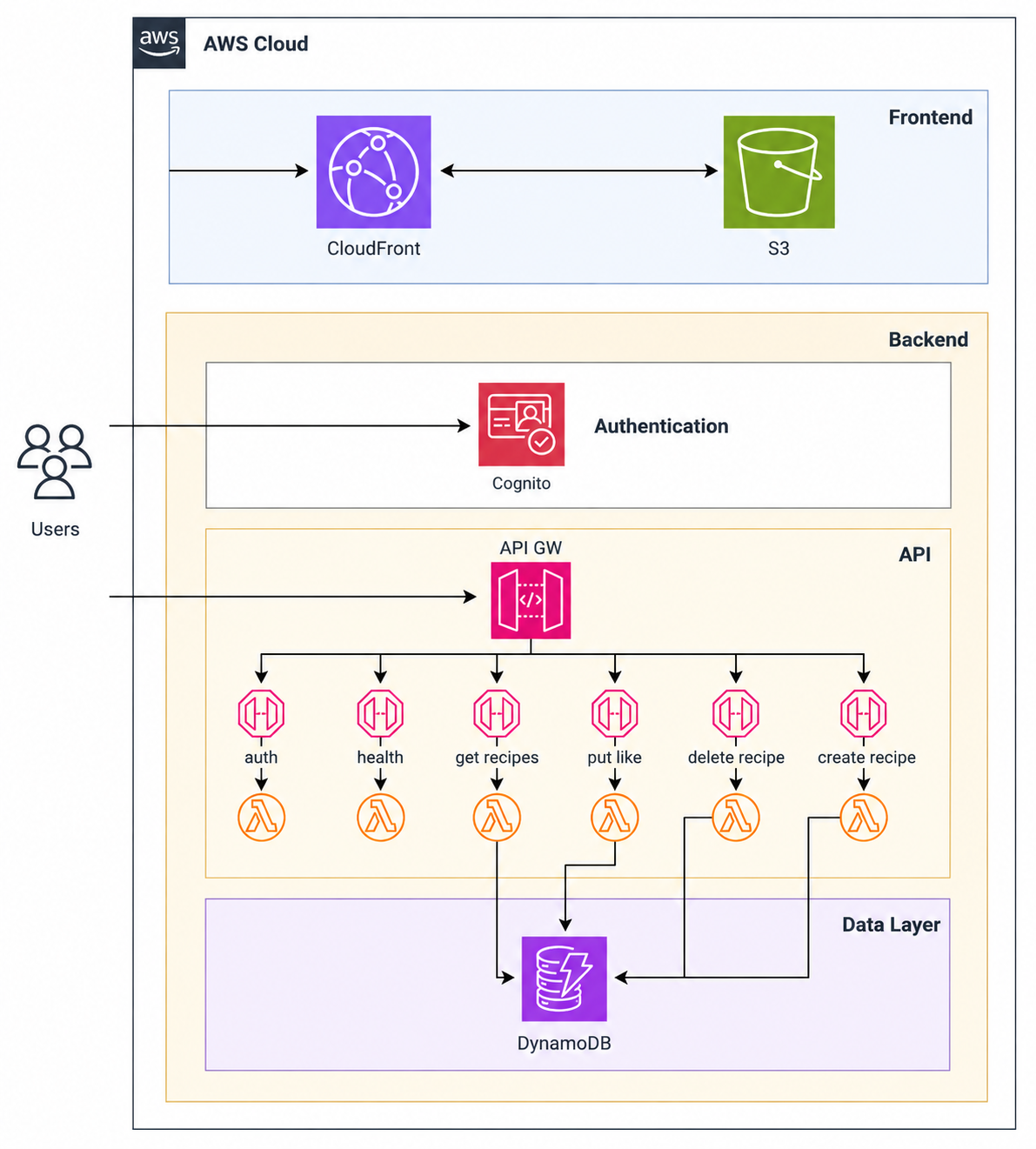
Configuration
Frontend Deployment
Frontend configuration included:
- S3 static website hosting
- assets storage
- CloudFront distribution
- Origin Access Control (OAC)
Best practices:
- restrict direct S3 access
- cache frontend content
- separate frontend infrastructure
Database Layer
DynamoDB configuration included:
- recipes table
- scalable billing mode
- Lambda integration
- NoSQL storage
Authentication
Authentication was implemented using Amazon Cognito.
Configuration included:
- User Pool
- user authorization
- admin creation
- email verification
Important note:
Cognito sends temporary credentials by emailBackend Services
The backend was implemented using Lambda and API Gateway.
Implemented endpoints:
- Authentication
- Health Check
- Get Recipes
- Create Recipe
- Delete Recipe
- Like Recipe
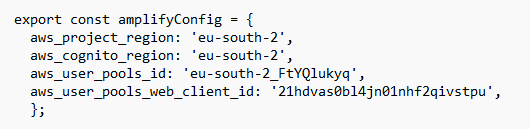
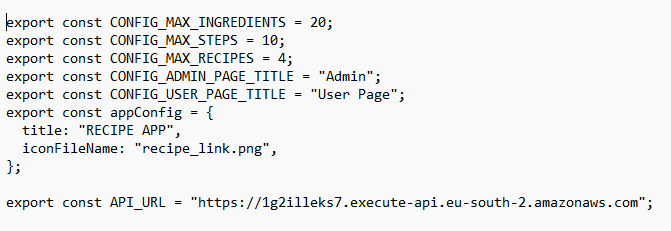
Frontend Configuration
After infrastructure deployment, frontend values must be updated.
Required files:
aws-exports.ts
configs.tsx
Values retrieved from Terraform:
- AWS Region
- Cognito User Pool ID
- Cognito Client ID
- API Gateway URL
Frontend Build
Build process:
npm install
npm run build
Upload:
content from 'dist/'
↓
S3 Bucket
Lessons Learned
This project helped reinforce:
- serverless design
- authentication workflows
- frontend deployment
- backend orchestration
- infrastructure automation
AWS Well-Architected Best Practices
Operational Excellence
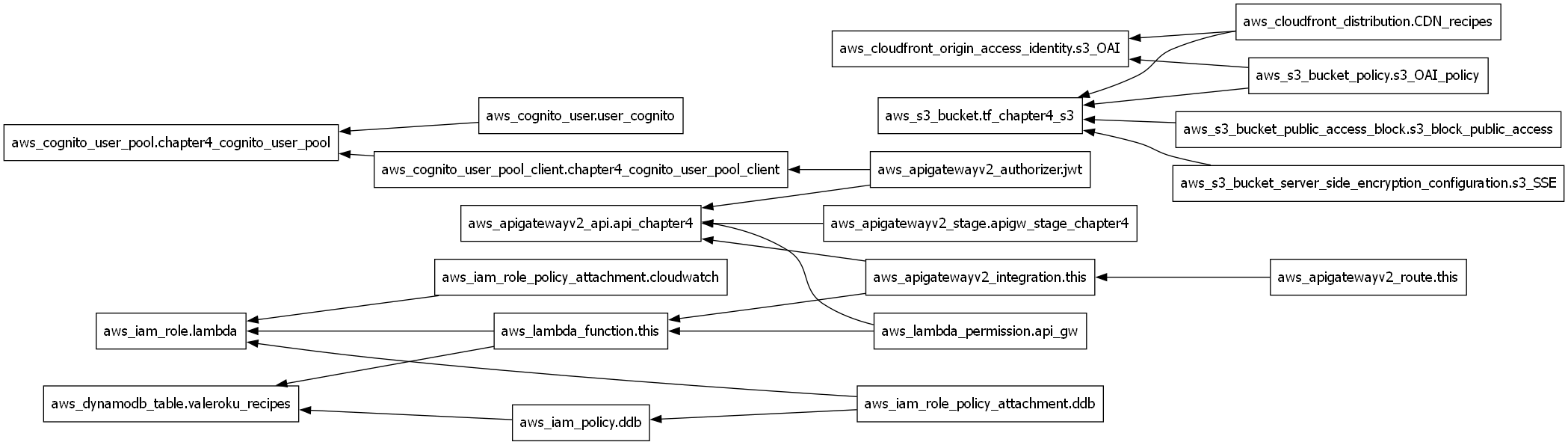
- Infrastructure provisioned using Terraform.
- Repeatable and automated deployments.
- Clear separation between frontend and backend components.
Security
- Authentication and authorization implemented using Amazon Cognito.
- Least-privilege access control through IAM roles and policies.
- Direct access to backend resources restricted through API Gateway.
- CloudFront Origin Access Control (OAC) used to protect S3 content.
Reliability
- Fully managed AWS services reduce operational overhead.
- DynamoDB provides built-in high availability.
- Serverless architecture removes dependency on individual servers.
Performance Efficiency
- CloudFront improves global content delivery performance.
- Lambda automatically scales based on application demand.
- DynamoDB provides low-latency access to application data.
Cost Optimization
- Pay-per-use serverless services minimize infrastructure costs.
- No EC2 instances required.
- DynamoDB and Lambda scale according to actual usage.
Sustainability
- Serverless services automatically adjust resource consumption.
- Managed AWS services reduce infrastructure waste.
Project Results
Key outcomes:
- Successfully deployed a fully serverless recipe-sharing web application on AWS.
- Implemented secure user authentication using Amazon Cognito.
- Built a scalable backend using Lambda and API Gateway.
- Stored and managed application data using DynamoDB.
- Delivered the frontend globally through CloudFront and S3.
- Automated the infrastructure deployment using Terraform.
References
Project Code
You can find the Terraform code used in this project in the following GitHub directory.
Loading...
Comments